.svg)
.svg)
PRODUCTS

Your product team spent three months on a grid-based catalog page. Product photography, hover zoom, variant selectors. Then someone embedded a 15-second vertical video on a listing. That video outsold the entire gallery in two weeks.
This keeps happening. Full-screen video with a floating buy button makes the old browse-then-click model feel broken. Users want to see products move, swipe to the next, and tap buy without leaving the feed. Nobody needs onboarding for a format they already use on TikTok and Instagram.
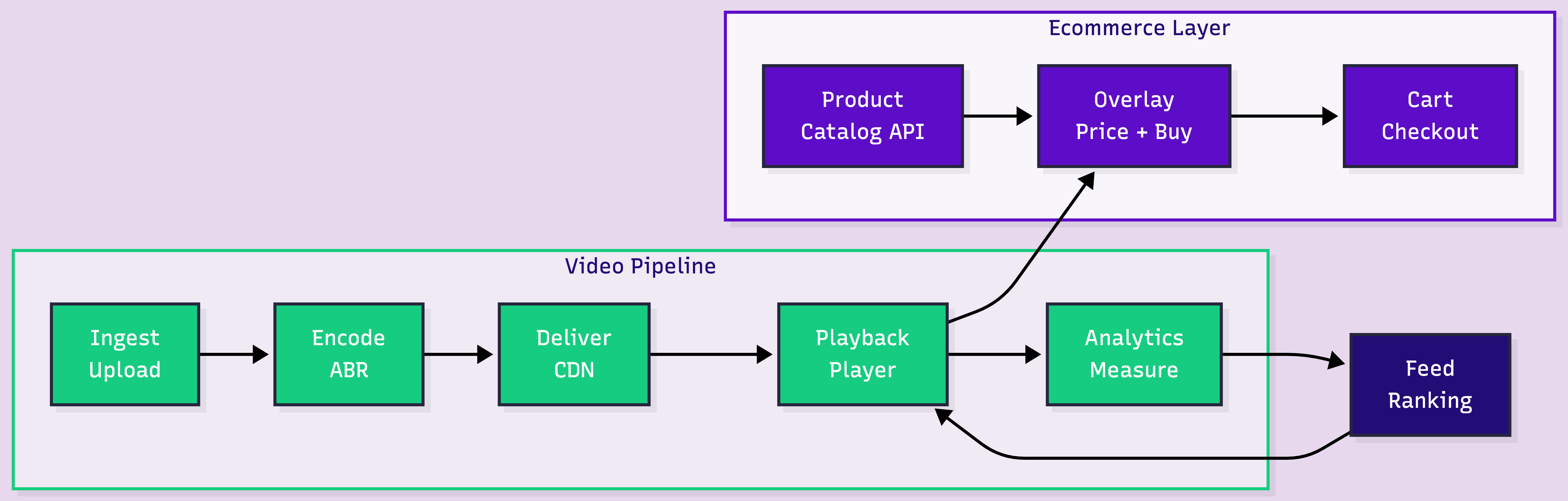
Building this looks like a frontend project. It is not. The hard part is the video pipeline. The harder part is the ecommerce plumbing: catalog sync, feed ranking, moderation, attribution.
Key takeaways:
The feed UI is three browser APIs: CSS scroll-snap, Intersection Observer, a floating product card. What gets complex is everything behind it.
Product teams or sellers upload short vertical clips: 9:16, 1080x1920, 15-60 seconds. A 30-second 1080p video is 50-80 MB. On mobile, uploads this size fail silently without chunked upload support.
The simplest path is URL-based ingest. Your backend sends a video URL to the API, the platform pulls it server-side:
curl -X POST https://api.fastpix.io/v1/on-demand \
 -u "$ACCESS_TOKEN_ID:$SECRET_KEY" \
 -H "Content-Type: application/json" \
 -d '{
   "inputs": [{ "type": "video", "url": "https://your-cdn.com/product-video.mp4" }],
   "metadata": { "product_id": "SKU-9821", "category": "footwear" }
 }'
This returns a playback ID. The video streams at https://stream.fastpix.io/{playbackId}.m3u8 once encoding completes. For direct uploads, SDKs for web, iOS, and Android handle chunking and retry automatically.
Users swipe fast. Every video needs to start instantly, even on 4G. That means adaptive bitrate streaming: converting each upload into multiple renditions so the player starts low and switches up as bandwidth allows.
Context-aware encoding goes further. Instead of a fixed bitrate ladder, it analyzes each clip's visual complexity. A talking-head review needs less bitrate than a fashion runway clip. For 10,000+ product videos, the bandwidth savings compound across CDN delivery.
Encoded renditions ship as HLS segments through a global CDN. Apple developed HLS, Safari supports it natively, every other browser handles it through hls.js.
Speed matters for catalogs that update frequently. In benchmarks with a 177.2 MB file, FastPix reached playback-ready in 29.4 seconds. Typical 15-30 second product clips are faster.
Three browser APIs, all with broad support:
CSS scroll-snap locks each swipe to one video. scroll-snap-type: y mandatory on the container, scroll-snap-align: start on each slide.
Intersection Observer triggers autoplay when a video is 75% visible, pauses on scroll-out. No carousel library needed.
Product overlay: a floating card (thumbnail, name, price, buy button) positioned over the video. This reads from your product catalog API, not video metadata. The playback ID or product ID in the video's metadata is the join key.
Keep it minimal. The video sells. The card converts. Name, price, one button. Variants go in a bottom sheet on tap.
This is the layer most teams skip. It determines whether the feed is a feature or a growth engine.
A user who watches 90% of a jacket demo before tapping "Add to Cart" is a different signal than someone who bounced at 3 seconds. Static product pages can't capture that. Four metrics matter:
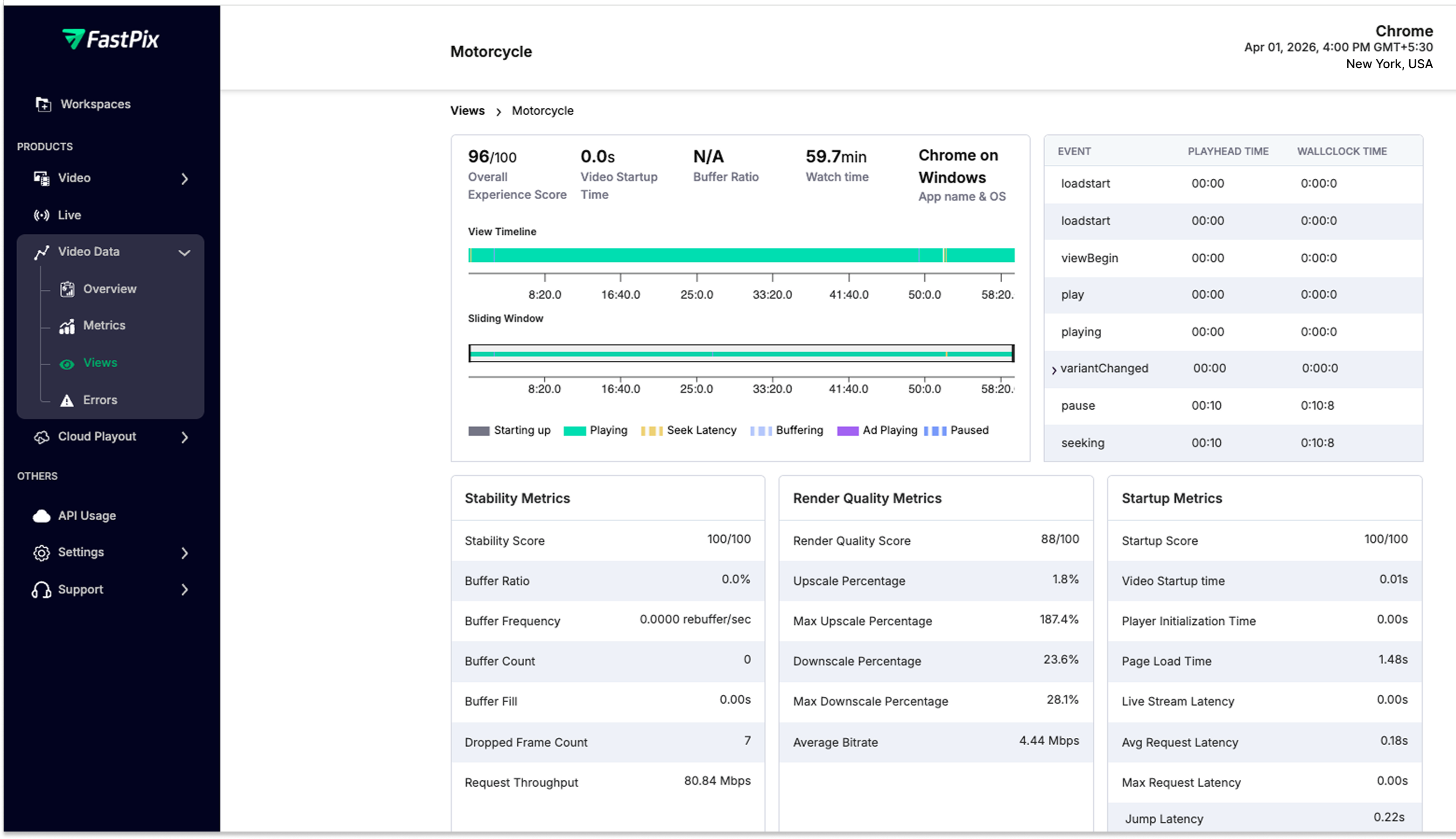
FastPix Video Data captures 50+ data points per view session with custom metadata (product ID, category, source). Query the analytics API to find which categories complete highest, whether sub-20s videos convert better, or if rebuffering correlates with cart abandonment. Free up to 100K views/month, with $25 in credits to test the full pipeline.
50 hand-picked videos work great. 10,000 SKUs with sellers uploading daily is a different system.
Feed ranking. Chronological order stops working fast. Sort by 7-day cart-add rate, boost new uploads for 48 hours. Even this simple ranker outperforms reverse-chronological. ML personalization comes later.
Catalog freshness. If a product goes out of stock, the overlay must reflect it before the user taps buy. Stale overlays that show "out of stock" on the cart page destroy trust. Cache with 60-120 second TTL, or websocket push for inventory changes.
Content moderation. UGC sellers uploading video means a review pipeline: moderation queue, rejection workflows, re-review on appeal. Without this, low-quality content hits the feed.
Attribution. A user watches three product videos, leaves, searches directly, buys from the PDP. Without multi-touch attribution, you over-credit the last video and miss the ones that built intent.
Prefetch strategy. Preload 3 videos: instant playback. Preload 10: wasted bandwidth. Tune to average swipe depth per session.
Cloud primitives give maximum control over encoding and CDN. That matters if video is your core differentiator. For a shopping feed where the product content and UX are the differentiator, most teams find the video engineering time hard to justify. FastPix handles the full pipeline at $0.03/min encoding and $0.00096/min delivery at 1080p.
Three challenges follow once engagement data starts flowing:
Live shopping. Real-time product demos where a host shows items while viewers buy in-feed. Requires RTMPS/SRT ingest, low-latency delivery, and automatic live-to-VOD conversion so every broadcast becomes a replayable reel. FastPix supports live streaming with VOD recording through the same API.
Sound-off accessibility. Most users scroll muted. Auto-generated subtitles are table stakes. FastPix In-Video AI generates subtitles during processing, and In-Video Search lets users find products across your video catalog by natural language query.
Personalized ranking. Stop showing every user the same feed. Start with segments: new users see top performers, returning users see fresh uploads in preferred categories. Per-user ML comes later.
For implementation code, the Build a Short Video App like TikTok tutorial covers the full-screen vertical feed pattern.
Get $25 in free credits and build the full pipeline. Try it yourself!
Vertical video at 9:16 aspect ratio, 1080x1920 resolution. Keep product videos between 15 and 60 seconds. Adaptive bitrate encoding ensures playback adjusts to network conditions automatically. For product demos with text overlays (price callouts, feature labels), test at lower renditions to make sure the text stays readable.
Embedded videos sit inside a traditional product page. A reels-style feed replaces the browsing model: full-screen vertical video, scroll-snap navigation, autoplay-on-view, and a floating product card with an in-feed buy button. The user never leaves the video feed to browse or purchase. The product overlay pulls live catalog data, so pricing and inventory stay current.
The pipeline has five stages: video upload and ingest, encoding into adaptive bitrate renditions, CDN delivery via HLS, client-side playback with scroll-triggered autoplay, and per-video engagement analytics. A full-stack video API like FastPix handles the first four stages through a single integration, with analytics capturing 50+ playback data points per view session.
Costs depend on your approach. Assembling individual cloud services means per-GB storage, per-GB bandwidth, and per-minute encoding across separate bills. A unified video API like FastPix charges approximately $0.03 per minute for encoding and $0.00096 per minute for delivery at 1080p. $25 in free credits on signup covers roughly 800 minutes of encoding or 26,042 minutes of delivery.
Yes. Platforms supporting both on-demand video and live streaming can blend pre-recorded reels with real-time shopping broadcasts. The key requirement is automatic live-to-VOD recording, so a live session becomes a replayable reel the moment the broadcast ends. FastPix supports RTMPS and SRT ingest for live streams with this conversion built in.
What metrics matter most for a shoppable video feed?
Four metrics: video completion rate per product (do users watch the full clip), tap-through rate on the product card overlay, cart-add rate per video, and playback quality (startup time, rebuffering). Tying completion and conversion data to product IDs lets you rank feed content by actual revenue impact rather than view count. FastPix Video Data captures 50+ data points per session, free for up to 100K views per month.


.avif)

.png)

